 HeadTidy
Meeting notes that survive the meeting
Almost everyone takes meeting notes in the order things were said. Almost nobody needs them in that order afterwards.
Written by Rene Reede Updated 17 August 2026
The problem with chronological notes
A meeting produces four kinds of thing, and they arrive interleaved: decisions, actions, open questions, and context that is merely interesting. Writing them down in the order they were spoken guarantees that the two that matter, what was decided and who is doing what, end up buried in the middle of the two that do not.
Then the note goes into a folder, and the actions never leave it. The failure is not that the notes were bad. It is that a note is a dead end: nothing in it has a date, so nothing in it ever comes back to find you.
The four-branch method
- Build the skeleton before anyone speaks
A centre card with the meeting name and date, and four branches: Decided, Actions, Open, Context. Thirty seconds, and it means that during the meeting you are only ever choosing a branch, never inventing a structure.
- Capture with the keyboard, not the mouse
Tab adds a child, Enter adds a sibling, arrow keys move between parent, siblings and children. You can stay on the keyboard for a whole meeting, which is the only way note-taking keeps up with speech.
- Put the owner on the action as it is agreed
An action card takes an owner and a priority. "Someone should look into that" is not an action; it is a decision to have the same conversation again next month.
- Date it in the room
Due today, tomorrow, this weekend and next week are one click each; anything else takes a date and an optional time. This is the step that separates a note from a plan, and it takes about two seconds per action.
- Use a table when the meeting is a list of things
Candidate reviews, budget lines, bug triage, supplier quotes: drop a table on the canvas with typed columns (person, date, status, priority, currency), and paste straight from a spreadsheet if someone sends one. Any row can then be promoted into a connected task card, so the row and the task stay in step.
- Spend two minutes on it afterwards, not twenty
Move anything from Open that got answered into Decided. Delete the context nobody will ever read. Then close it: the actions will come back on their own, through Today.
Centre: Project check-in, 11 August.
Decided: "Launch moves to 30 September", "We are not building the import this quarter". Two cards, and in six weeks when somebody asks why, they are findable in two seconds by searching the word "import" across every map.
Actions: "Rewrite the pricing page" (Maya, Friday, high), "Get a quote for the photography" (me, next week), "Ask legal about the refund wording" (Sam, no date, because it depends on the quote). Three cards with owners.
Open: "Do we need a second tier at all?" This is the one that matters. It has no owner and no date, and it goes on the map so that it is still visible next month instead of being quietly dropped because nobody wrote it down.
Context: one card with the two numbers that were mentioned. Everything else that was said goes nowhere, on purpose.
Friday morning, Today shows the pricing page. Not the note. The task.
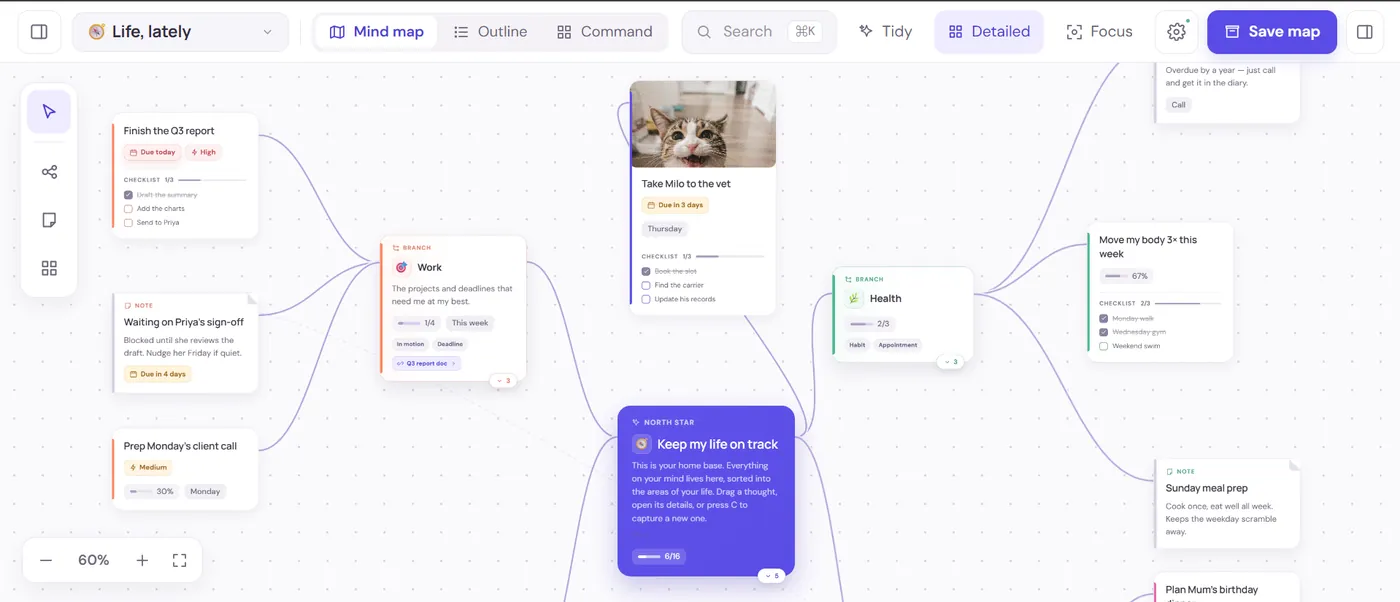
Sharing the notes without losing them
A private share link gives someone a view of the map, or an edit role if they should be able to change it, and comments come back into the same map rather than into an email thread. If the person wants a document, export the map as Markdown, which comes out as a clean indented outline, or as PNG or A3-paginated PDF if they want the picture. OPML opens in most other mapping tools.
Two habits worth adding
First: keep one map per recurring meeting rather than one per occurrence. The Open branch then accumulates across months, and that branch is usually the most honest document in the company.
Second: at the end of the week, open Plan and switch it to Week. Anything agreed on Monday that is still sitting there on Friday was not really an action, and it is better to admit that than to carry it for a quarter. The weekly planning method builds that into a routine.
Getting your work back out
Worth checking before you commit to any tool: what happens when you want to leave, and what happens when you make a mistake. HeadTidy exports every map as JSON, Markdown, OPML, PNG or A3-paginated PDF. The JSON re-imports losslessly; the OPML opens in most other mapping tools, so moving on does not mean retyping.
Inside the app the Vault holds 50 steps of undo and redo, twelve recoverable checkpoints per map, and a Trash that keeps deleted maps and thoughts. Maps live in the browser first and sync when you are online, with the saving, offline and conflict states always visible rather than hidden behind a spinner. Read more about private sharing, recovery and exports.
Frequently asked questions
How do you take meeting notes as a mind map?
Build four branches before the meeting starts, Decided, Actions, Open and Context, with a centre card naming the meeting and date. During the meeting you only choose a branch rather than inventing structure, using Tab for a child and Enter for a sibling so you can stay on the keyboard. Put an owner and a date on every action at the moment it is agreed.
What should go in meeting notes?
Four things, kept apart: what was decided, what someone is now doing and by when, what is still open, and the small amount of context worth keeping. Everything else that was said should go nowhere on purpose. The value of notes is what you leave out.
Why do actions from meetings never get done?
Usually because the note is a dead end. Nothing in it has a date, so nothing in it ever comes back to find you. If an action carries an owner and a due date at the moment it is agreed, it turns up in Plan on the right morning without anyone reopening the note.
Can I share a HeadTidy map with people who were not in the meeting?
Yes. A private share link gives someone a view of the map, or an edit role, and their comments come back into the same map. You can also export as Markdown for a document, PNG or A3 PDF for the picture, or OPML for another mapping tool.
Is HeadTidy free?
Yes. The free plan covers 3 maps, 120 thoughts, and 10 images with no card required, and it is a plan rather than a trial, nothing expires. Pro is €5 a month or €48 a year.