 HeadTidy
HeadTidy vs Coggle
Coggle is one of the quickest ways to get a clean mind map out of your head. HeadTidy is built for the map you are still using a month later.
Written by Rene Reede Updated 17 August 2026
These comparisons focus on workflows and capabilities. Check each provider’s current plans for pricing and limits.
The structural difference
Coggle is admirably focused. Branches, colours, a shared link, done, and for sketching a structure in ten minutes that focus is a genuine feature rather than a limitation. Nothing gets in the way.
The limitation shows up later. A Coggle diagram is a picture of a structure, so a month after you draw it, it is still a picture of a structure. There is no date on it, nothing recurs, nothing tells you which branch has gone stale, and no view assembles what you owe across the eleven diagrams you have made.
HeadTidy keeps the fast part, Tab for a child, Enter for a sibling, arrow keys to move around, Space to fold a branch, C to capture from anywhere, and then lets the map carry weight.
What sits on the canvas in HeadTidy
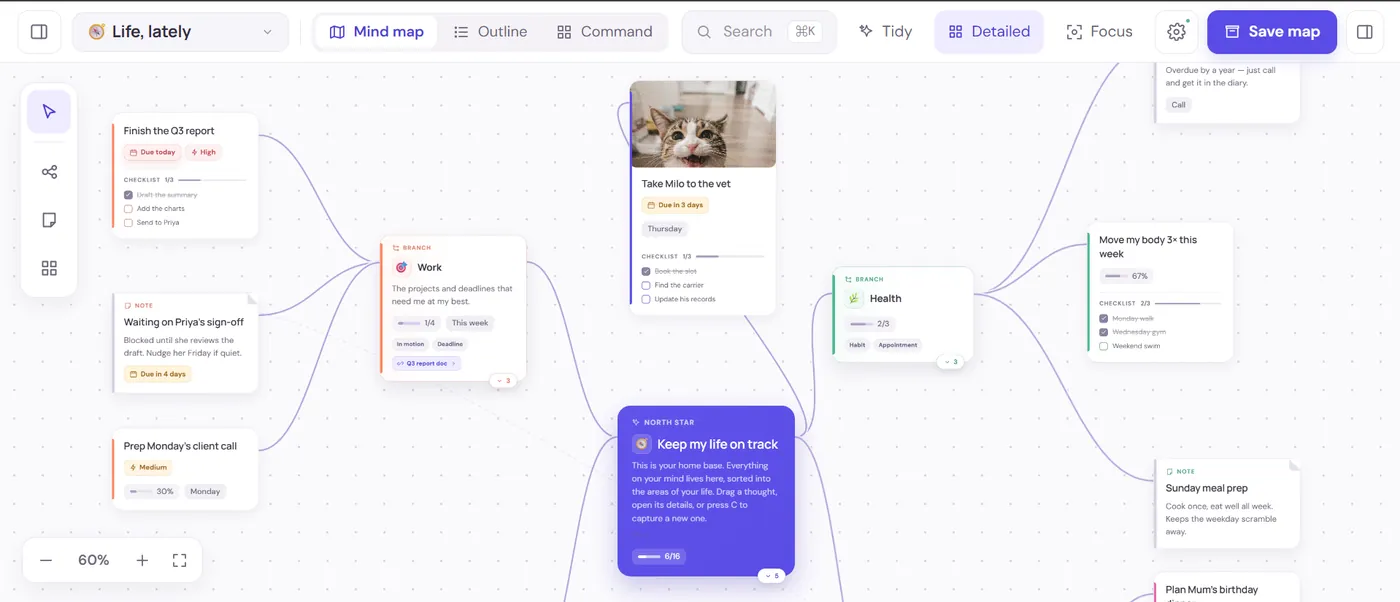
The reason a personal map turns into action here is that a thought is not only a label. Any card can carry the following, and none of it lives in a second app:
- A due date, an optional time and a repeat
Daily, weekdays, weekly, fortnightly, monthly, quarterly or yearly. Ticking a repeating card off lines up the next occurrence rather than just marking it done, so "water the plants" and "file the quarterly return" both stop needing a separate list.
- A checklist inside the card
Sub-steps stay folded into the thought they belong to instead of exploding your map into twenty tiny nodes. The card shows progress as 2/5 on the canvas.
- A live table, right on the map
Typed columns, text, number, currency, date, person, checkbox, status, priority, with sum, average, count, min and max in the footer. Filter, sort, group and hide-done are built in, you can paste a block straight from a spreadsheet, and any row can be promoted to a connected task card.
- A habit with a schedule
Check-ins land on the card itself, and it can be paused without losing the history, which matters more than a streak counter, because streaks punish the week you were ill.
- Notes, images and a sketch pad
Drop a photo on any thought. Notes open a small drawing surface with five inks, three pen sizes, an eraser and its own undo, saved through the same pipeline as an attachment.
- A portal to another map
When a branch outgrows its map, it becomes a doorway to its own canvas instead of a mess. Search still reaches into it.
Five ways to read the same maps
Capturing visually and reviewing visually are different jobs, and most mapping tools only do the first. The same thoughts render as:
- Map, the canvas, for shape and relationships.
- List, the same thoughts flattened, for when you just want to work through them.
- Today, everything due now across every map, not just the one you have open, with week, month and timeline ranges.
- Calendar, dated thoughts on a real calendar.
- Outline, the map as indented text, which is also how it exports to Markdown.
And Ctrl/⌘+K searches across every map at once, by thought, person, owner, due window, map or folder, so nothing is lost just because you cannot remember which canvas you put it on.
Side by side
| Job | HeadTidy | Coggle |
|---|---|---|
| Draw a clean map fast | Keyboard-first, eight starter templates, auto-arrange | Its core strength, and very good at it |
| Dates, repeats, priorities | Built in, plus Today, Calendar and List views | Not the tool for this |
| Numbers on the map | Typed tables with sum, average, count, min and max | Text branches only |
| Habits and check-ins | Schedules and history on the card, pausable | No |
| Many maps, one search | ⌘K across every map, by person, due window or map | Per-diagram |
| Version history | 50 undo steps, 12 checkpoints per map, recoverable Trash | Change history on paid plans |
In Coggle you would map the syllabus, module, topic, sub-topic, and it would be a genuinely useful picture of what you have to learn. Then you would print it, and revise from a list somewhere else.
In HeadTidy the same map keeps working. Each topic gets a status (not started, in motion, done) so the canvas shows coverage at a glance. Weak topics get due dates spread across the fortnight, so Today hands you two topics a day instead of a wall of them. A Past papers table tracks paper, date, mark and a checkbox for reviewed, and the footer averages the marks column, so improvement is a number rather than a feeling. Twenty minutes of retrieval practice becomes a habit with a weekday schedule. The student guide covers the method in full.
HeadTidy works when
- Your diagrams keep going stale a week after you draw them.
- You want dates, habits, tables and checklists on the map itself.
- You have more than a couple of maps and need one search over all of them.
- You want it to work offline.
It does not when
- You want the simplest possible diagram tool and nothing more.
- Real-time co-editing on a diagram matters to you.
- You mostly make one-off diagrams to share and then discard.
- You prefer a tool with no concept of tasks at all.
Getting your work back out
Worth checking before you commit to any tool: what happens when you want to leave, and what happens when you make a mistake. HeadTidy exports every map as JSON, Markdown, OPML, PNG or A3-paginated PDF. The JSON re-imports losslessly; the OPML opens in most other mapping tools, so moving on does not mean retyping.
Inside the app the Vault holds 50 steps of undo and redo, twelve recoverable checkpoints per map, and a Trash that keeps deleted maps and thoughts. Maps live in the browser first and sync when you are online, with the saving, offline and conflict states always visible rather than hidden behind a spinner. Read more about private sharing, recovery and exports.
Frequently asked questions
Is HeadTidy free?
Yes. The free plan covers 3 maps, 120 thoughts, and 10 images with no card required, and it is a plan rather than a trial, nothing expires. Pro is €5 a month or €48 a year.
Is HeadTidy as fast to draw in as Coggle?
Close, and for the same reason: it is keyboard-first. Tab makes a child, Enter makes a sibling, arrow keys move between parent, siblings and children, F2 renames, Space folds a branch and C opens Quick Capture from anywhere. There is also auto-arrange, so you are not dragging cards into alignment by hand.
Can I import a Coggle map?
Not directly. HeadTidy imports its own JSON. If you export from Coggle you will need to rebuild the map, which for a personal map is usually quicker than it sounds.
Does HeadTidy work offline?
Yes. Your maps live in the browser first and sync when you are online, with saving, offline and conflict states always visible.