 HeadTidy
HeadTidy vs Milanote
Milanote is a lovely place to collect things, images, links, snippets, arrangements. HeadTidy is a place to make sense of things and then do them.
Written by Rene Reede Updated 17 August 2026
These comparisons focus on workflows and capabilities. Check each provider’s current plans for pricing and limits.
The structural difference
Milanote is built around gathering. Its strength is the moodboard: drop in references, arrange them until the arrangement itself becomes the idea, and share the result. If you are a designer, art director or writer collecting material, that is precisely the right shape.
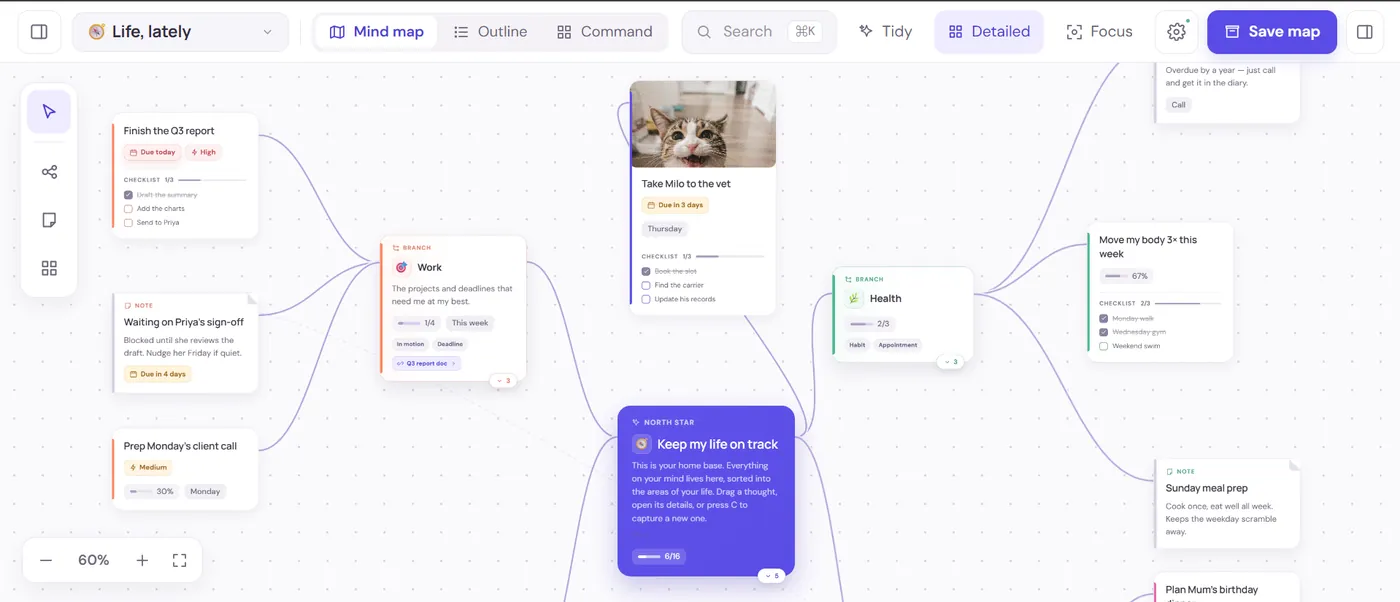
HeadTidy is built around the step after that. Its unit is a thought connected to other thoughts, and the interesting part is what a thought can carry: a due date with an optional time, a repeat rule, an owner, a priority, a checklist, an energy level, a habit schedule, a photo, a whole table. A Milanote board is a collection you look at. A HeadTidy map is a collection that tells you what is due.
Neither is a criticism. They answer different questions: what does this look like? versus what do I do about this?
What sits on the canvas in HeadTidy
The reason a personal map turns into action here is that a thought is not only a label. Any card can carry the following, and none of it lives in a second app:
- A due date, an optional time and a repeat
Daily, weekdays, weekly, fortnightly, monthly, quarterly or yearly. Ticking a repeating card off lines up the next occurrence rather than just marking it done, so "water the plants" and "file the quarterly return" both stop needing a separate list.
- A checklist inside the card
Sub-steps stay folded into the thought they belong to instead of exploding your map into twenty tiny nodes. The card shows progress as 2/5 on the canvas.
- A live table, right on the map
Typed columns, text, number, currency, date, person, checkbox, status, priority, with sum, average, count, min and max in the footer. Filter, sort, group and hide-done are built in, you can paste a block straight from a spreadsheet, and any row can be promoted to a connected task card.
- A habit with a schedule
Check-ins land on the card itself, and it can be paused without losing the history, which matters more than a streak counter, because streaks punish the week you were ill.
- Notes, images and a sketch pad
Drop a photo on any thought. Notes open a small drawing surface with five inks, three pen sizes, an eraser and its own undo, saved through the same pipeline as an attachment.
- A portal to another map
When a branch outgrows its map, it becomes a doorway to its own canvas instead of a mess. Search still reaches into it.
Five ways to read the same maps
Capturing visually and reviewing visually are different jobs, and most mapping tools only do the first. The same thoughts render as:
- Map, the canvas, for shape and relationships.
- List, the same thoughts flattened, for when you just want to work through them.
- Today, everything due now across every map, not just the one you have open, with week, month and timeline ranges.
- Calendar, dated thoughts on a real calendar.
- Outline, the map as indented text, which is also how it exports to Markdown.
And Ctrl/⌘+K searches across every map at once, by thought, person, owner, due window, map or folder, so nothing is lost just because you cannot remember which canvas you put it on.
Side by side
| Job | HeadTidy | Milanote |
|---|---|---|
| Visual reference boards | Images on cards, but not a moodboard tool | Its core strength |
| Turning notes into scheduled work | Dates, repeats, priorities, habits, Plan view | To-do cards, no scheduling engine |
| Numbers and tracking | Typed tables with sum/average/count on the canvas | Not a spreadsheet |
| Structure that emerges after capture | Quick capture to Inbox, then place it later | Boards are arranged by hand as you go |
| Works with no connection | Offline-first | Cloud-first, desktop app available |
| Export and leave | JSON, Markdown, OPML, PNG, PDF | PDF and board exports |
In Milanote you would build a gorgeous board, the colour palette, three competitor screenshots, the draft headline, a to-do column. It communicates the idea perfectly to another person.
In HeadTidy the same launch becomes a map with a North Star card at the centre (Ship the course page by 30 September) and branches for Copy, Design, Email and Pricing. Draft the headline gets a checklist and a due date. Pricing gets a table with a currency column, so the footer totals what the tiers add up to. Post daily on TikTok becomes a habit that checks in on the card. When you open the app on Tuesday, Today shows the two things due, and the other twenty stay quietly on the map. The content planner template is the same idea for publishing.
The honest version: for the launch's look, Milanote wins. For the launch actually shipping, the map wins.
HeadTidy works when
- The board keeps getting stale because nothing on it is scheduled.
- You want habits, dates and checklists beside the ideas.
- You want one search across every map you own.
- You want it to work offline and export cleanly.
It does not when
- Visual reference collection is the actual job.
- You need the board itself to be the deliverable you show a client.
- You want free-form placement with no centre and no hierarchy.
- You collect a lot of web clippings and want a browser clipper.
Getting your work back out
Worth checking before you commit to any tool: what happens when you want to leave, and what happens when you make a mistake. HeadTidy exports every map as JSON, Markdown, OPML, PNG or A3-paginated PDF. The JSON re-imports losslessly; the OPML opens in most other mapping tools, so moving on does not mean retyping.
Inside the app the Vault holds 50 steps of undo and redo, twelve recoverable checkpoints per map, and a Trash that keeps deleted maps and thoughts. Maps live in the browser first and sync when you are online, with the saving, offline and conflict states always visible rather than hidden behind a spinner. Read more about private sharing, recovery and exports.
Frequently asked questions
Is HeadTidy free?
Yes. The free plan covers 3 maps, 120 thoughts, and 10 images with no card required, and it is a plan rather than a trial, nothing expires. Pro is €5 a month or €48 a year.
Can HeadTidy do moodboards?
Partly. You can drop a photo onto any thought and sketch on notes, so a map can carry visual references. It is not a moodboard tool: there is no free placement of loose images and no web clipper. If arranging images is the point, Milanote is the better fit.
What does HeadTidy have that a board does not?
Scheduling and review. Due dates with optional times and reminders, repeat rules, habit schedules, priorities and owners, and then a Today, Calendar and List view that read across every map you own, plus tables with real calculations directly on the canvas.
Does HeadTidy work offline?
Yes. Your maps live in the browser first and sync when you are online, with saving, offline and conflict states always visible.