 HeadTidy
HeadTidy vs Notion
Notion is a documents and databases tool. HeadTidy is a canvas. Most people who bounce off Notion do so because the structure has to exist before they can start.
Written by Rene Reede Updated 30 August 2026
These comparisons focus on workflows and capabilities. Check each provider’s current plans for pricing and limits.
Product facts checked against Notion’s own documentation: database views, sharing and permissions, and content exports.
Structure first, or structure last
Notion is enormously capable once you know the shape of what you are building. That is also its cost: a database wants its columns defined, a page wants a hierarchy, and both of those are decisions you have to make before you have finished thinking. Plenty of people build a beautiful Notion system and never use it, because maintaining it became the task.
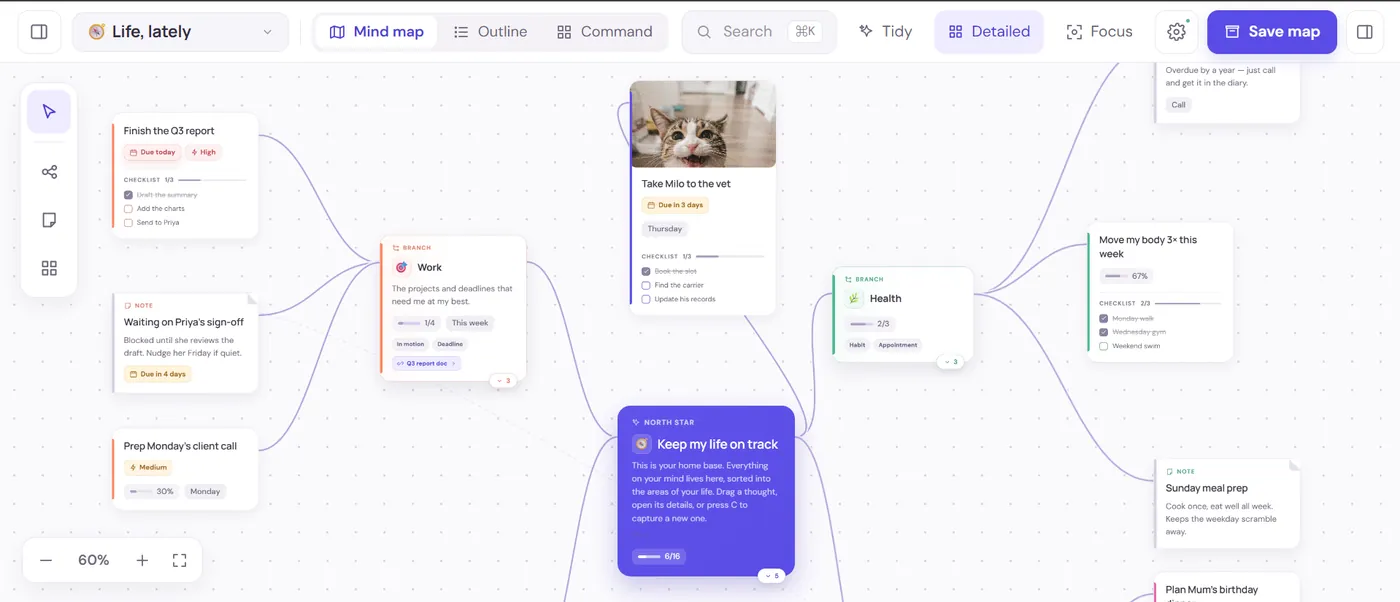
A map runs the other way. Everything goes on the canvas first and the structure emerges from where things ended up. That suits messy, half-formed thinking, a new project, a decision, a life that got complicated, and it suits people who remember where a thing is rather than what it was called.
Side by side
| Job | HeadTidy | Notion |
|---|---|---|
| Capture before the structure is clear | Place thoughts first, then connect and move them | Start inside a page, block or database structure |
| See one problem spatially | One connected canvas with collapsible branches | Pages, boards and databases arranged as views |
| Long documents and reference | Short notes stay attached to their context | Stronger for substantial documents and a shared wiki |
| Structured records | Lightweight editable tables on the map | Relational databases, formulas and multiple views |
| Personal follow-through | Dates, repeats, habits and Today across maps | Can be built with databases, properties and templates |
| Leave with your work | JSON, Markdown, OPML, PNG and PDF exports | Page and workspace export options for settled content |
At the beginning, the material is tangled: possible roles, financial constraints, people to ask, fears, skills, evidence and a dozen half-formed questions. HeadTidy lets those fragments land first. You can connect “need portfolio proof” to both a target role and a small project, then give the next conversation a date without turning the whole thought process into a database.
Once the direction settles, Notion is the stronger home for a polished portfolio brief, research notes, application records and documents other people need to read. Using the map for discovery and the document workspace for durable reference is often cleaner than forcing either tool to perform both jobs.
HeadTidy works when
- You think in shapes and positions rather than lists and pages.
- You want to start before you know how it should be organised.
- You want something small enough that maintaining it is not a hobby.
- You want the whole picture on one screen.
It does not when
- You need relational databases, rollups and formulas.
- You are running a team wiki or a content pipeline.
- You want long-form documents with heavy formatting.
- You need dozens of integrations into other systems.
They are not really rivals
Plenty of people use both, and that is a sensible answer rather than a fence-sitting one: the map for thinking, the document tool for reference material that has already settled. What HeadTidy will not do is become your company wiki, and it is not trying to.
Collaboration and portability
Choose Notion when a team needs to maintain shared documents, databases and repeatable operating material. Choose HeadTidy when the valuable object is one person’s connected map and collaborators mainly need a private view, a comment role or a focused edit role.
HeadTidy exports the map as lossless JSON for re-import, Markdown or OPML for portable text, and PNG or PDF for the picture. Those formats do not turn a visual map into a Notion database automatically, but they do keep leaving practical.
Frequently asked questions
Can HeadTidy replace Notion?
For personal thinking, planning and habit tracking, often yes. For team wikis, relational databases and long documents, no, and it is not built to.
Is HeadTidy simpler than Notion?
Deliberately. It has a canvas, a few card types, dates, habits and views. That is close to the whole product, which is the point: there is much less to maintain.
Can I use HeadTidy and Notion together?
Yes. Use HeadTidy while the structure is still emerging, then move settled reference material into Notion when a document or database becomes the better shape.