 HeadTidy
HeadTidy vs Obsidian
Obsidian is a linked library of Markdown files you own outright. HeadTidy is a canvas for the thinking that happens before anything is worth writing down properly.
Written by Rene Reede Updated 17 August 2026
These comparisons focus on workflows and capabilities. Check each provider’s current plans for pricing and limits.
The structural difference
Obsidian's unit is the note: a text file on your disk, linked to other text files. Over years that becomes something genuinely valuable, a personal reference library that is yours in the strongest sense, plain files in a folder, with a plugin ecosystem that will bend it into almost any shape you like.
It asks something in return. You have to be a person who writes, who maintains links, and who is willing to configure. A great many people install it, admire it, and quietly stop opening it, because the thinking they wanted help with never made it as far as a well-formed note.
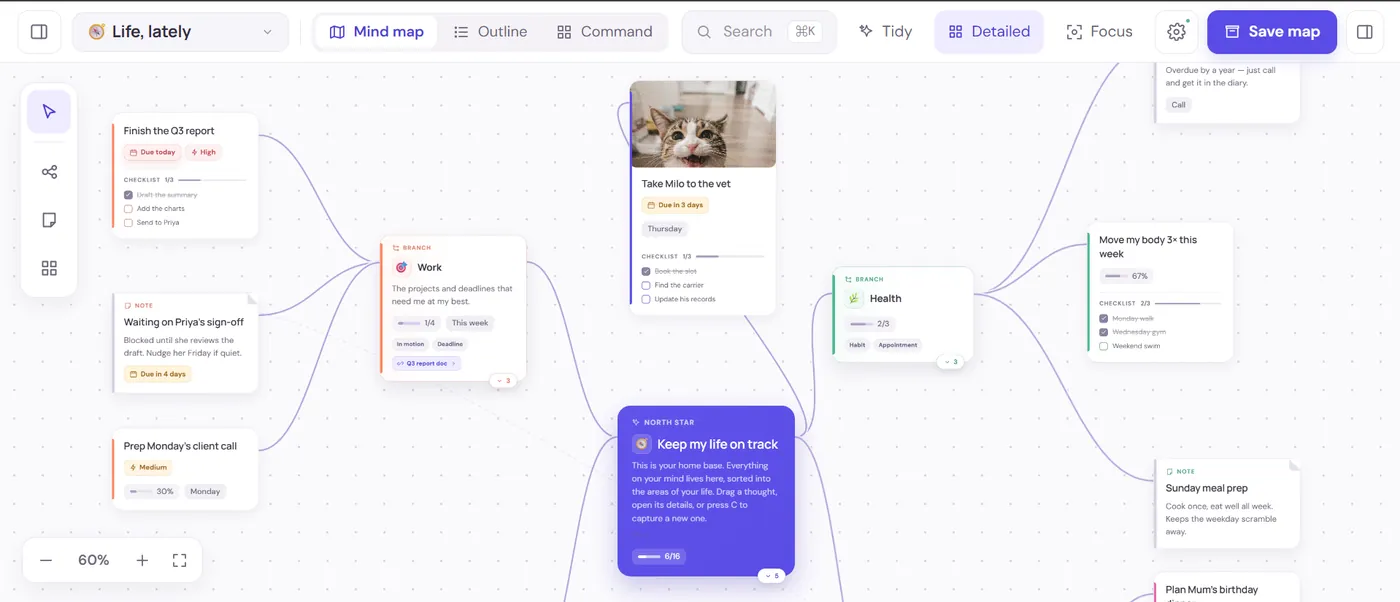
HeadTidy starts earlier and asks less. You dump thoughts, and they can stay half-formed on a canvas where their relationships are visible before they are articulate. Then, without changing tools, a thought can pick up a date, a repeat, a checklist, an owner or a habit schedule.
What sits on the canvas in HeadTidy
The reason a personal map turns into action here is that a thought is not only a label. Any card can carry the following, and none of it lives in a second app:
- A due date, an optional time and a repeat
Daily, weekdays, weekly, fortnightly, monthly, quarterly or yearly. Ticking a repeating card off lines up the next occurrence rather than just marking it done, so "water the plants" and "file the quarterly return" both stop needing a separate list.
- A checklist inside the card
Sub-steps stay folded into the thought they belong to instead of exploding your map into twenty tiny nodes. The card shows progress as 2/5 on the canvas.
- A live table, right on the map
Typed columns, text, number, currency, date, person, checkbox, status, priority, with sum, average, count, min and max in the footer. Filter, sort, group and hide-done are built in, you can paste a block straight from a spreadsheet, and any row can be promoted to a connected task card.
- A habit with a schedule
Check-ins land on the card itself, and it can be paused without losing the history, which matters more than a streak counter, because streaks punish the week you were ill.
- Notes, images and a sketch pad
Drop a photo on any thought. Notes open a small drawing surface with five inks, three pen sizes, an eraser and its own undo, saved through the same pipeline as an attachment.
- A portal to another map
When a branch outgrows its map, it becomes a doorway to its own canvas instead of a mess. Search still reaches into it.
Five ways to read the same maps
Capturing visually and reviewing visually are different jobs, and most mapping tools only do the first. The same thoughts render as:
- Map, the canvas, for shape and relationships.
- List, the same thoughts flattened, for when you just want to work through them.
- Today, everything due now across every map, not just the one you have open, with week, month and timeline ranges.
- Calendar, dated thoughts on a real calendar.
- Outline, the map as indented text, which is also how it exports to Markdown.
And Ctrl/⌘+K searches across every map at once, by thought, person, owner, due window, map or folder, so nothing is lost just because you cannot remember which canvas you put it on.
Side by side
| Job | HeadTidy | Obsidian |
|---|---|---|
| Long-form writing | Notes on cards, not a writing environment | Excellent |
| Thinking before it is articulate | The whole point: capture loose, arrange later | Needs a note to exist first |
| Local file ownership | Browser-first with lossless JSON, Markdown and OPML export | Plain Markdown on your own disk |
| Dates, repeats and habits | Built in, with Today across every map | Community plugins |
| Setup cost | None: open a template and go | Real, and ongoing if you use plugins |
| Graph view | The map is the graph, and you place it yourself | Auto-generated, more decorative than useful at scale |
In Obsidian this becomes a note, and probably a good one, if you can write it. But the reason the decision is hard is that you cannot yet say what you think, which is precisely the condition under which a blank note is useless.
In HeadTidy you open the Thinking session template and get a structure for exactly this: the outcome you are optimising for, the root obstacle rather than the symptom, a table of evidence, assumptions and unknowns, the consequences and the downside you would have to live with, and a smallest reversible next step as a real task with a date on it. The evidence table has typed columns, so "how confident am I" is a status column you can sort by, and the unknowns are visibly unknown instead of quietly missing. The decision-making guide walks through the same six questions.
Two weeks later, Today reminds you about the review date you set. That is the part a note cannot do.
HeadTidy works when
- You think in relationships and space, not in prose.
- Your notes app has become a place ideas go to be forgotten.
- You want the thinking and the follow-through in one tool.
- You do not want to spend a weekend configuring plugins.
It does not when
- You write a lot, and the writing is the artefact.
- You want plain files on your own disk, with no service in between.
- You are building a reference library meant to last a decade.
- You enjoy configuring your tools and want a plugin for everything.
Plenty of people run both, and it is a sensible pairing: map on the canvas while the thinking is still moving, write it up properly once it has stopped. HeadTidy's Markdown and OPML exports drop straight into a vault.
Getting your work back out
Worth checking before you commit to any tool: what happens when you want to leave, and what happens when you make a mistake. HeadTidy exports every map as JSON, Markdown, OPML, PNG or A3-paginated PDF. The JSON re-imports losslessly; the OPML opens in most other mapping tools, so moving on does not mean retyping.
Inside the app the Vault holds 50 steps of undo and redo, twelve recoverable checkpoints per map, and a Trash that keeps deleted maps and thoughts. Maps live in the browser first and sync when you are online, with the saving, offline and conflict states always visible rather than hidden behind a spinner. Read more about private sharing, recovery and exports.
Frequently asked questions
Is HeadTidy free?
Yes. The free plan covers 3 maps, 120 thoughts, and 10 images with no card required, and it is a plan rather than a trial, nothing expires. Pro is €5 a month or €48 a year.
Can I export a HeadTidy map into my Obsidian vault?
Yes. Every map exports as Markdown, which drops straight into a vault as a readable indented outline, and as OPML if you want to open it in another mapping tool. Lossless JSON export exists separately for backup and re-import.
Does HeadTidy store my maps locally?
Maps live in the browser first and keep working offline; with an account they also sync to the project’s Supabase service. That is not the same as plain files on your own disk. If local file ownership is your priority, Obsidian is the stronger answer.
Is a mind map better than linked notes?
For different stages. A map is better while you are still working out what you think, because it shows relationships before you can put them into sentences. Linked notes are better once you know what you think and want it to last.