 HeadTidy
Free study plan template for exams and active recall
Turn a syllabus into visible practice, realistic dates and one clear next study session, without building a second system just to study.
Use this template free Free, no account, opens in your browser.
What’s included
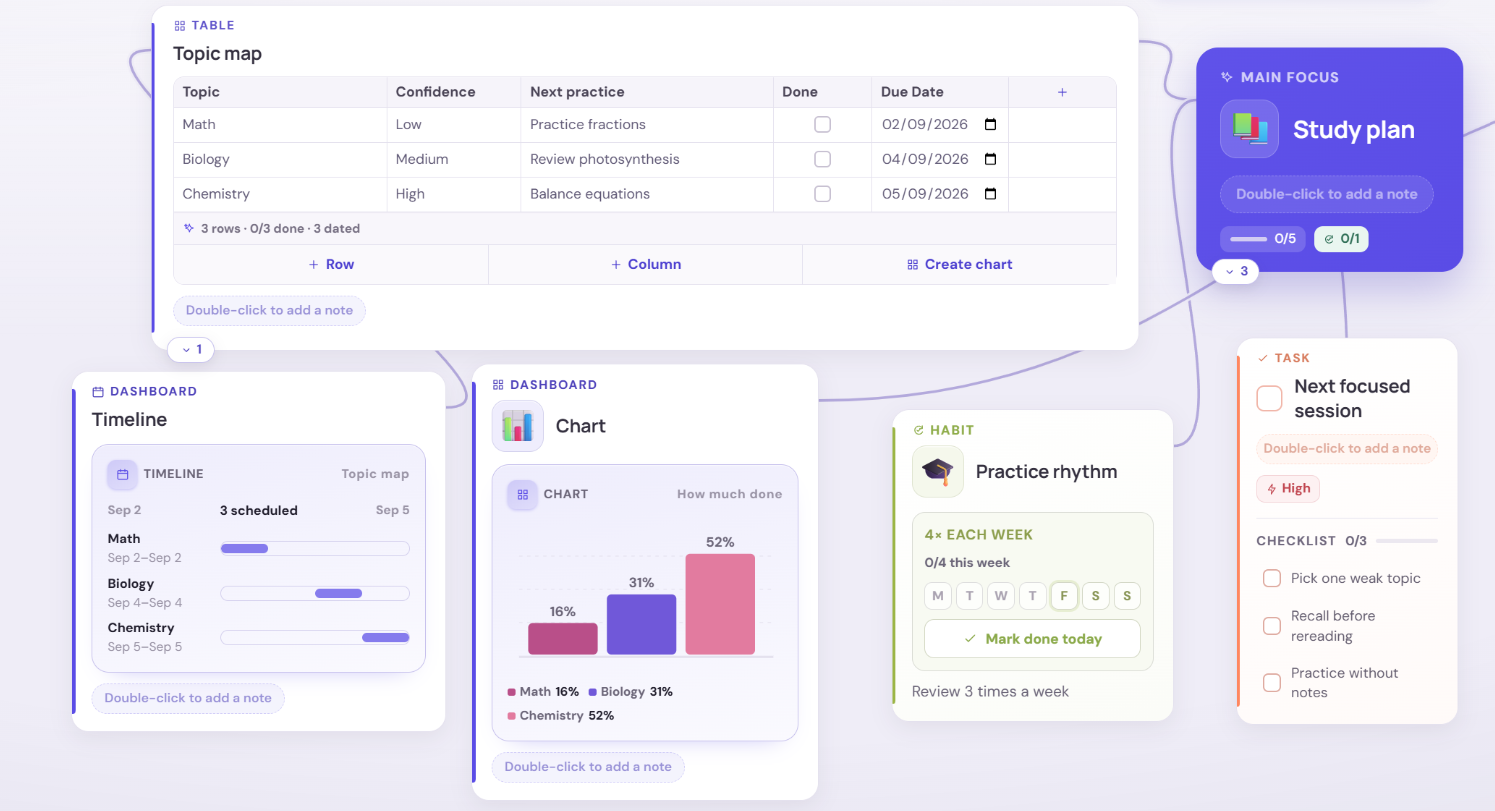
- An editable topic table: confidence, next practice date, recall score and done
- A practice timeline and a recall-score chart, both drawn from that one table
- A weekly practice habit and a high-priority focused-session checklist
- A note for the exam date, format, allowed resources and what “ready” means
Study from what you can retrieve, not what you have reread
Rereading feels productive because it feels fluent. Retrieval feels worse and works better: closing the book and producing the answer is what shows you which topics are actually secure. The template is built around that difference. Confidence records how it feels, the recall score records what you could actually produce, and the two are allowed to disagree, the gap between them is the most useful number on the map.
Make the confidence scale mean something
A scale that measures mood tells you nothing a week later. Define the three levels by what you can do, then use them consistently:
- Low, you cannot explain it without looking. You have read it; you cannot produce it.
- Medium, you can produce most of it, with gaps you already know about.
- High, you can explain it to someone else and answer a follow-up question.
High is deliberately hard to reach. A topic sitting at Medium two weeks before an exam is normal; a syllabus full of High in week one usually means the scale has drifted.
Fill one table, get the plan
The topic table is the source of truth and nothing else has to be maintained. Type the topics in once, then: the Next practice dates draw the practice timeline, the Recall score numbers draw the chart, the habit protects the rhythm, and the focused-session card keeps the next block small enough to actually begin. Change a date in the table and the timeline moves. You never copy the plan into a second place, which is the step that usually kills a revision schedule in week two.
Space the practice, and let the gaps be uneven
Short retrieval sessions spread over time beat one long session, and the spacing should not be equal for every topic. Book a weak topic again in two or three days; a topic you scored well on can wait a week or more. That is what the date column is for, it lets the intervals differ per topic instead of forcing one schedule across the whole syllabus.
Photosynthesis: confidence Low, recall score 20. Next practice becomes “draw the light-dependent reactions from memory”, dated for Thursday. On Thursday you use the focused-session checklist, recall first, check the gaps second, explain the mistakes third, and update the score to 45. The chart moves, and the next practice goes in for Sunday rather than three weeks away. Genetics, already at 80, gets pushed to the following week instead of taking a slot it does not need.
The last week before the exam
Stop adding topics. Sort the table by recall score, take the lowest three, and give each one a dated session under past-paper conditions rather than more notes. Anything already scoring high needs one quick retrieval pass, not a rewrite. If the exam date note says the format is essay-based, practise essays; if it allows a formula sheet, stop memorising the sheet.
Four ways a study plan quietly fails
- Every topic gets equal time. The table exists so the weak topics are visibly the ones with the earliest dates.
- The plan becomes the work. Colour-coding a timetable is not revision. If a session produces no answer you had to retrieve, it did not count.
- Nothing is dated. An undated topic is a wish. The timeline is empty for exactly as long as the dates are.
- Progress is never re-measured. A confidence level set in week one is a memory of week one. Update the score each time you practise, or the chart is describing a syllabus you no longer have.
How to use this template
- Start
Add the exam date, format and what “ready” actually means.
- Sort
List the topics with confidence, a recall score and a next practice date.
- Move
Open the focused-session checklist on the weakest topic and start there.
Frequently asked questions
Is this study template really free?
Yes. Open it from this page and it loads straight into your browser with no account, no email and no trial. Your map is stored on your own device until you choose to make an account and sync it.
How do I make a study plan for exams?
Start from the outcome rather than the calendar: write the exam date, its format and what a ready answer looks like. Then list every topic on the syllabus, mark how much of it you can currently produce from memory, and give the weakest topics the earliest practice dates. A plan built from confidence and dates survives a disrupted week; a fixed timetable does not.
What is active recall and how does this template use it?
Active recall means producing an answer from memory before checking it, rather than rereading until it feels familiar. The template uses it in two places: the recall score column records what you could actually produce, and the focused-session checklist runs the session in the right order, recall first, check the gaps second, explain the mistakes third.
How many topics should I study in one session?
One, in most cases. The focused-session card is deliberately built around a single weak topic, because switching between three topics in an hour usually produces three shallow passes and no retrievable memory. If a topic is genuinely small, pair it with one you scored badly on rather than with two new ones.
How far ahead should I start revising?
Far enough that a topic can be practised more than once with a gap in between, which for most exams means weeks rather than days. The honest test is not the calendar but the table: if every topic still has a Low confidence and no second practice date, there is not yet enough runway, and the first thing to cut is the number of topics you are trying to reach High on.
Can I use it on my phone?
Yes. The map, the table, the checklist and the habit all work in a mobile browser, so you can tick off a practice session or update a recall score away from your desk. Longer editing, laying out topics, planning the dates, is easier on a larger screen.
Do the timeline and chart fill themselves in?
They draw themselves from the topic table, so they start empty and appear as you type. Add a practice date and a bar appears on the timeline; add a recall score and the chart gains a column. Nothing is entered twice.
Copy a link to this page and send it to someone who needs a starting point.